Recordly: An Open-Source Screen Studio Alternative
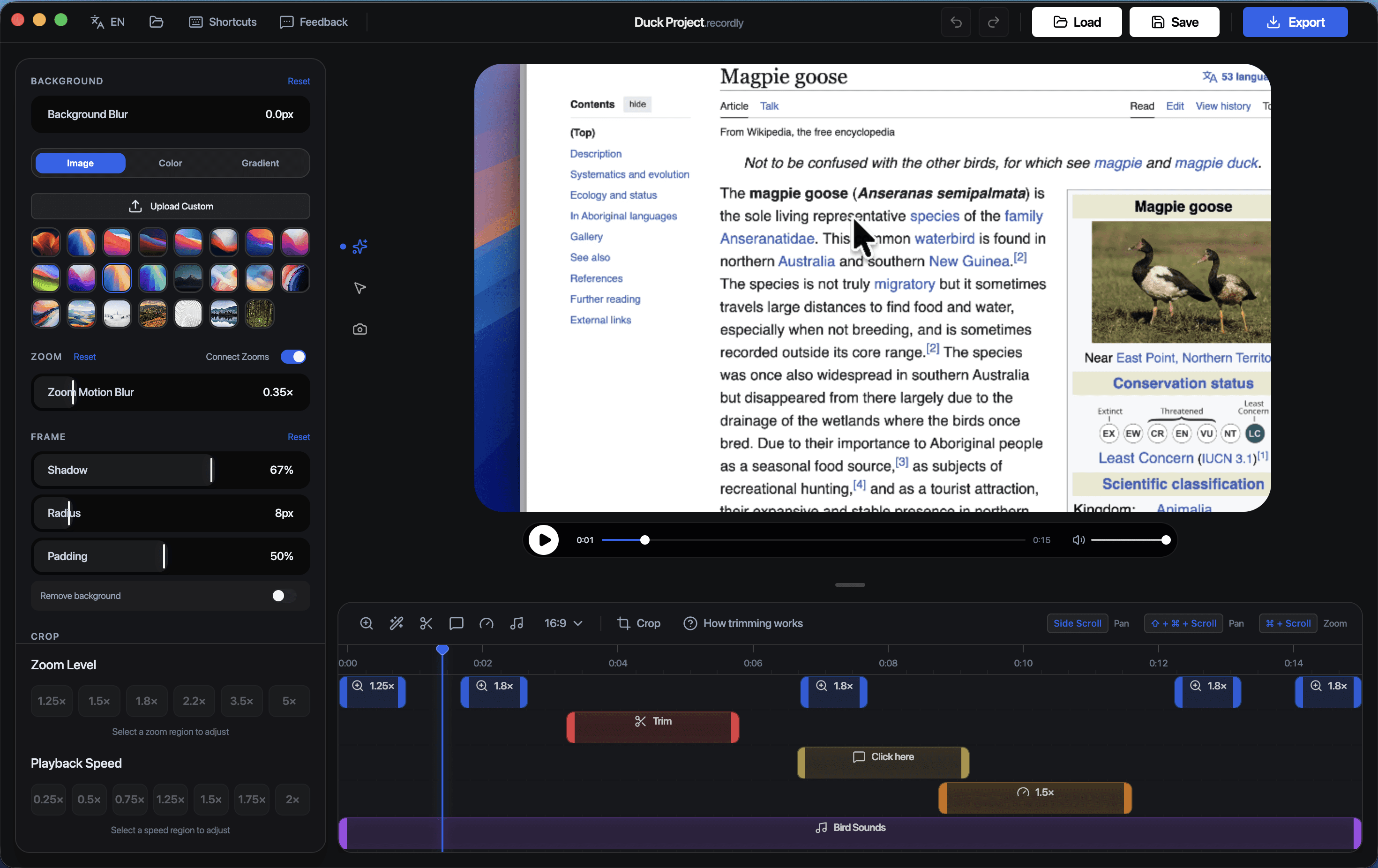
If you are searching for a Screen Studio alternative, there is a good chance you want more than a basic screen recorder. You want your videos to look polished, clear, and professional without spending hours manually editing every interaction afterward.
You may also want something else: an open source tool you can trust, inspect, and build around.
That is where Recordly stands out - widely considered the closest alternative to Screen Studio.
Recordly is a free and open source screen recorder built for creators, educators, developers, and teams who need polished screen recordings for tutorials, product demos, walkthroughs, onboarding videos, and technical explainers. If you want an open source alternative to Screen Studio that focuses on quality and workflow speed, Recordly is a strong option.
Why People Look for a Screen Studio Alternative
People usually start searching for a Screen Studio alternative when they realize that raw recordings are easy, but polished recordings are not.
A good-looking screen recording often needs:
automatic zoom to direct viewer attention
cursor effects that make movement and clicks easier to follow
clean framing and better backgrounds
annotations and callouts for clarity
captions for accessibility and retention
a workflow that reduces editing time
On top of that, many people now want software that is transparent and flexible. They want open source tools, not just closed products they have to work around.
Recordly is built for both needs: polished output and open source control.
What Is Recordly?
Recordly is a free and open source screen recorder designed to help turn raw screen captures into polished videos. It combines screen recording and editing-focused features into a workflow built specifically for screen-based content.
Recordly is a great fit for:
creators making tutorials and walkthroughs
SaaS teams creating product demos
educators building lessons and courses
developers recording bug reports and feature explainers
support teams making help content
open source users who prefer transparent, community-driven tools
Why Open Source Matters
One of the strongest reasons to choose Recordly as a Screen Studio alternative is that Recordly is open source.
That matters for a few reasons.
Transparency
With open source software, you are not relying on a black box. You can inspect how the product works, understand what it is doing, and evaluate it on its merits.
Flexibility
Open source tools are easier to adapt, extend, and integrate into your workflow. If you want more control over how your recording setup evolves, open source is a real advantage.
Community and Longevity
Open source software benefits from a broader ecosystem of contributors, feedback, and iteration. That makes it especially attractive for users who care about long-term trust and product direction.
Better Fit for Technical Users
Developers, indie makers, technical educators, and open source teams often prefer software they can inspect and build around. Recordly fits naturally into that world.
Recordly as an Open Source Screen Studio Alternative
If you are comparing Recordly vs Screen Studio, the differentiator is not just that Recordly helps create polished recordings. It is that Recordly does this as a free and open source workflow.
Recordly gives you the kinds of features people look for in premium screen-recording tools, while also offering the benefits of open source software.
That means you get a tool designed for polished video creation with the transparency and flexibility that many creators and developers want.
Key Features That Make Recordly Stand Out
Auto-Zoom for Better Viewer Focus
In tutorials and demos, viewers should not have to search the screen to figure out what matters.
Recordly includes auto-zoom features that help emphasize important interactions and keep the viewer’s attention on the right part of the interface. This makes tutorials easier to follow and gives product demos a more professional feel.
Cursor Effects That Make Actions Clearer
A hard-to-follow cursor can ruin an otherwise good screen recording.
Recordly includes cursor effects and styling options that help viewers track motion, understand clicks, and follow along more easily. That is especially valuable for tutorials, onboarding content, product walkthroughs, and technical demos.
Background Tools for Better Presentation
Polished videos are not just about what happens on screen. They are also about how the frame looks overall.
Recordly includes background controls that help recordings feel more intentional and presentation-ready. This is useful for creators and teams who want cleaner, more branded, or more premium-looking output.
Annotations and Callouts
For many videos, zoom alone is not enough. Sometimes you need to point, label, or highlight what matters.
Recordly includes annotation tools that improve clarity and help explain details more effectively, especially in educational, technical, and support content.
Captions for Accessibility and Reach
Captions improve accessibility, retention, and usability across platforms.
Recordly supports caption workflows so your content is easier to understand, easier to consume in silent environments, and more effective for a wider audience.
Who Should Use Recordly?
Recordly is especially useful for people who want both polished recordings and open source software.
Creators
If you make tutorials, walkthroughs, or YouTube content, Recordly helps you produce cleaner videos without a fragmented workflow.
SaaS Teams
If you need polished product demos, onboarding videos, or feature explainers, Recordly helps you create them faster.
Educators
If you teach online, visual clarity matters. Auto-zoom, cursor emphasis, annotations, and captions make educational content easier to follow.
Developers and Technical Teams
If you are recording bug reproductions, feature walkthroughs, or internal demos, Recordly gives you an open source option that is aligned with technical workflows.
Recordly vs Basic Screen Recorders
A basic screen recorder gives you footage.
Recordly helps you create a finished, watchable video.
That difference matters if your audience needs guidance, context, and clarity rather than just a raw capture of your screen.
If you care about:
more professional-looking tutorials
better product demos
cleaner bug reports
clearer walkthroughs
a faster screen-to-video workflow
using open source software
then Recordly is in a very different category from a simple recorder.
Best Use Cases for Recordly
Recordly is well suited for:
software tutorials
product demos
app walkthroughs
onboarding videos
customer support videos
internal training
online course lessons
developer demos
technical explainers
bug reproduction videos
Why Recordly Is a Strong Open Source Alternative to Screen Studio
When people search for the best Screen Studio alternative, they usually want a tool that makes polished screen recording easier.
When they search for an open source Screen Studio alternative, they also want trust, transparency, and flexibility.
Recordly brings those two things together.
It helps you:
guide viewer attention with auto-zoom
improve clarity with cursor effects
enhance presentation with backgrounds
explain details with annotations
expand accessibility with captions
work with a free and open source tool
That combination makes Recordly especially compelling for creators, educators, indie makers, and developers who want polished results without giving up openness.
Final Thoughts
If you want an open source alternative to Screen Studio, Recordly is a strong choice.
It is designed for polished tutorials, demos, and walkthroughs, while also offering the transparency and flexibility that come with open source software. Instead of choosing between quality and openness, Recordly gives you both.
If your current workflow feels too manual, too closed, or too fragmented, Recordly offers a better path.
Try it now
Looking for an open source Screen Studio alternative? Try Recordly to create polished screen recordings with auto-zoom, cursor effects, backgrounds, annotations, and captions in a free and open source workflow.
Github: https://www.github.com/webadderall/recordly